
RONE SIDECHAIN
Draw the duck, lock the low end — silent at the kick’s first sample, every time.
Free RONE account · install it from the RONE Plugins Center · yours for good · included in ALL ACCESS
 + RONE VST MANAGER, free foreverAll your plugins in one library, one click away from your DAW. It's $39 on its own and comes free with this plugin.
About RONE Sidechain
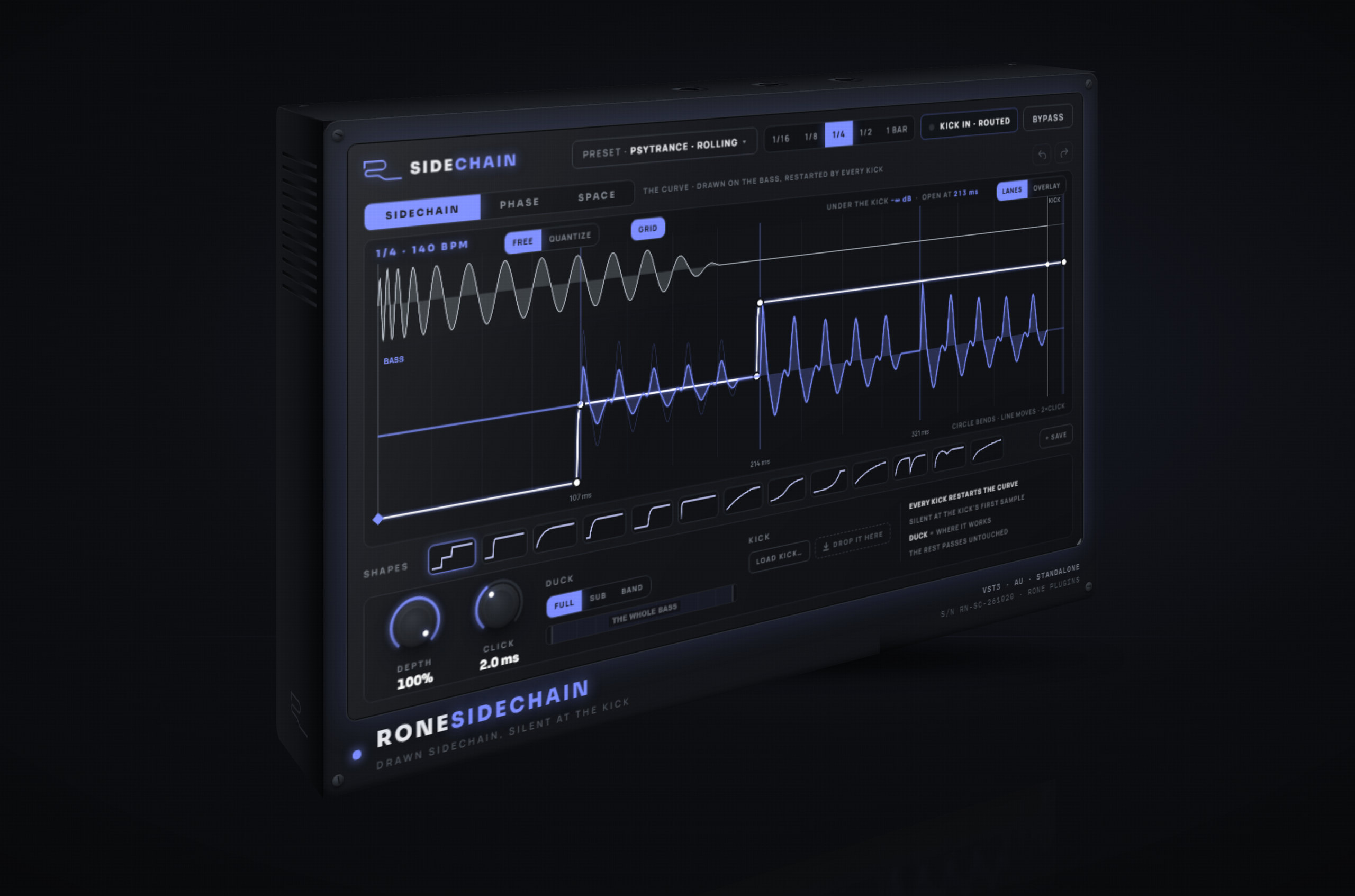
RONE Sidechain is the duck you draw. You see one cycle of the beat the way you see it in a playlist: the kick on top, the bass under it, and the curve drawn right over the bass. Every kick restarts the curve, and at the kick’s first sample the bass is exactly silent. Not almost. A short CLICK fade before the kick makes sure the cut never clicks, and there is no tail left hanging under the next hit.
Draw it point by point, drag a whole level or step at once, bend a slope from the circle in its middle, or start from one of thirteen shapes, from 1/16 to a full bar. DUCK decides where it works: the whole bass, only its sub, or a band you drag. Everything outside it passes untouched.
The low end is where kick and bass fight hardest, so two more pages handle it. PHASE turns only the bass’s sub to meet the kick’s tail, so the handover is one continuous wave. AUTO finds the turn by itself, and the turn only moves while the duck is closed, so you never hear it move. SPACE cuts the bass with narrow bells, only where the kick actually plays and only while it plays. Route your kick into it, drop a kick sample on it, or let it follow the beat. When the kick stops arriving, in a render of the bass alone, the last kick it heard keeps playing silently, so the render sounds exactly like the mix.
The real plugin, playing by itself
The real interface, running in your browser on an example loop. The sound engine is stood in for here, so read the numbers as an illustration.
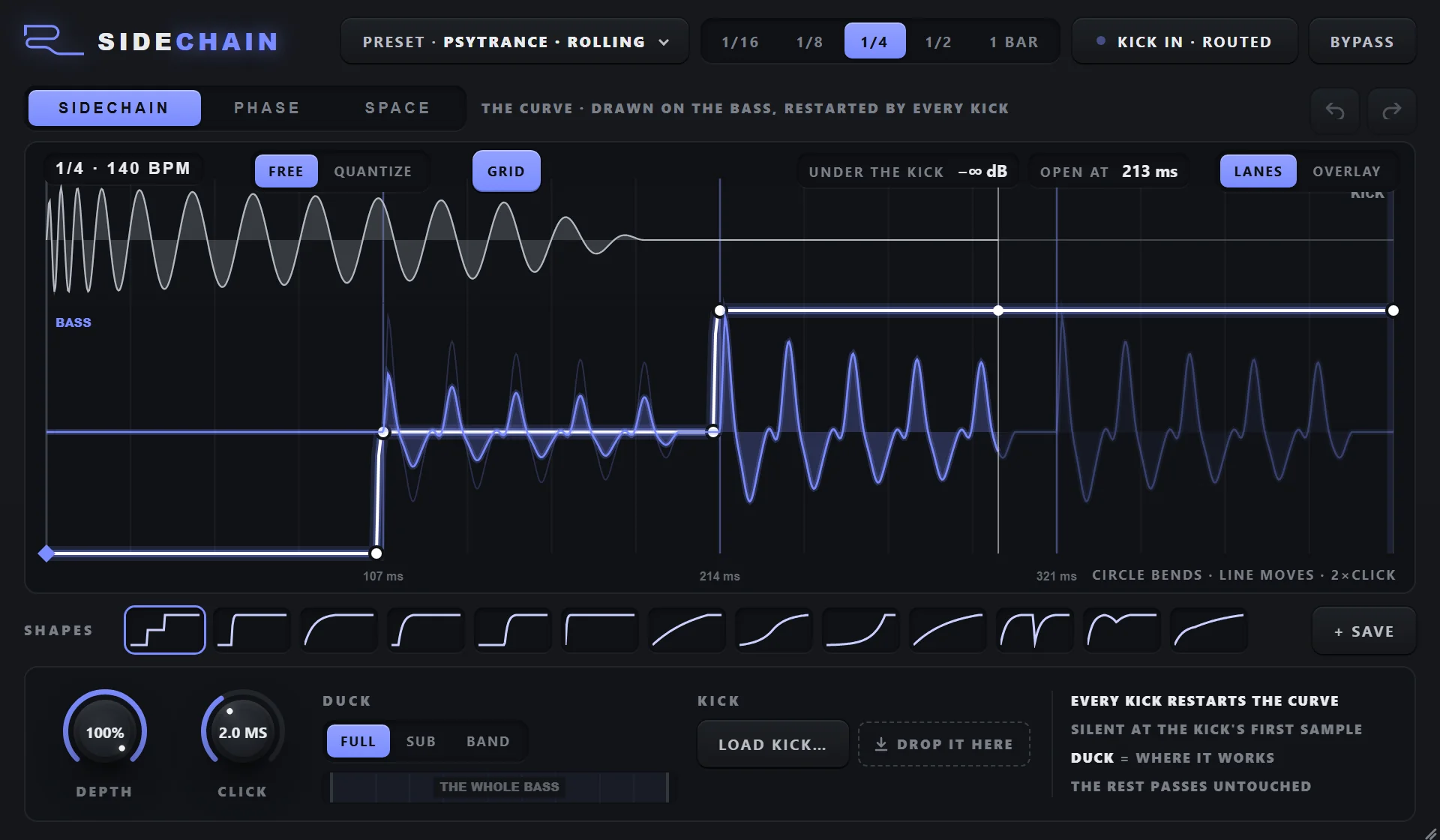
Draw the duck on the bass
The kick on top, the bass under it, the curve right over the bass. Drag a whole level at once, pull a point into a fade, bend a slope from its circle - the bass redraws as you go.
Thirteen shapes, a preset per genre
Start from a shape, set the length from 1/16 to a full bar, or open a preset made for psytrance, techno, house, EDM, drum & bass or trap.
Silent at the kick, only where it matters
DEPTH sets how far it closes - at 100% the bass is exactly silent at the kick. CLICK is the fade before the hit. DUCK picks the whole bass, only its sub, or a band you drag.
One low end
PHASE turns only the bass’s sub to meet the kick’s tail, so they add up instead of cancelling. SPACE cuts a sharp bell into the bass where kick and bass fight, only while the kick plays.
What it does
Silent at the kick
The curve restarts on every kick and the bass is exactly silent at its first sample. CLICK sets the fade before the kick, complete at the hit, so the cut never clicks.
Draw it your way
Drag points, move a whole level or step at once, bend a slope from its circle, double-click to add or remove. FREE or QUANTIZE, thirteen shapes in your own order, save your own.
Duck only where it matters
FULL ducks the whole bass, SUB only its low end, BAND only between two handles you drag. The rest passes untouched, linear-phase.
PHASE: one low end
The bass’s sub turns to meet the kick’s tail, so kick and bass add up instead of cancelling. AUTO sets it by itself, MANUAL leaves it to you, ON/OFF lets you hear the difference.
SPACE: room for the kick
Narrow bells cut the bass only where the kick is loud and the bass has something there, only while the kick plays. You watch them move live, and the strip shows exactly when they work.
Any kick, even in a render
A routed sidechain, a kick sample dropped on the plugin, or the beat itself. The last kick heard keeps playing silently when the sidechain goes quiet, so a render of the bass alone still ducks.
When you reach for RONE Sidechain
A few settings to start from.
The kick’s 16th, closed
On the bass, rate 1/4: the STEP shape keeps the kick’s sixteenth silent, lets the first bass note in at half and the rest at full. Drop your kick on the plugin and you’re done, no routing needed.
DEPTH 100 % · CLICK 2 ms
Duck only the low end
A bass with a bright top line: set DUCK to BAND and drag it to 20–200 Hz. The sub clears out for the kick while the mids and highs of the bass keep playing straight through.
RANGE 20 Hz – 200 Hz
Kick tail into bass, one wave
Open PHASE, leave it on AUTO and watch the scope: the bass’s sub turns until it continues the kick’s tail. Switch PHASE off and on to hear the low end fill out.
SPLIT 90 Hz
Before you install
System requirements
- Windows
- 64-bit · VST3, AAX and Standalone
- macOS
- 10.15 Catalina or later, Intel and Apple Silicon · VST3, AU, AAX and Standalone
- Pro Tools
- AAX on Windows and macOS.
- Not included
- CLAP
- Account
- A free RONE account, on up to 2 computers
- Internet
- To sign in and install. After that it keeps working offline for up to 90 days on a lifetime licence, 8 days on ALL ACCESS.
Install in three steps
- Make a free RONE account. Sign up here, no card.
- Download the RONE Plugins Center from the page that opens, install it and sign in.
- The Center installs RONE Sidechain and unlocks it. If your DAW does not list it yet, scan for new plugins.
Common questions about RONE Sidechain
What formats does RONE Sidechain come in, and on which systems?
RONE Sidechain runs as VST3, AU and Standalone on macOS 10.15 Catalina or later (Intel and Apple Silicon), and as VST3 and Standalone on Windows (64-bit). It also installs as AAX on Windows and macOS, so it runs in Pro Tools. CLAP is not included.
Which DAWs does RONE Sidechain work in?
Any DAW that loads VST3 on Windows, or VST3 or AU on macOS: Ableton Live, FL Studio, Logic Pro, Pro Tools (AAX), Cubase, Studio One, Bitwig Studio, REAPER and others. The Standalone version runs on its own, without a DAW.
How do I get RONE Sidechain?
RONE Sidechain is free. It needs a free RONE account and the free RONE Plugins Center app, which installs, updates and unlocks it on up to 2 computers. No card, no trial. It is also part of RONE ALL ACCESS, every RONE plugin for $20 a month or $149 a year.
Does RONE Sidechain need the kick routed into it?
It takes a routed kick, a dropped kick sample, or the beat itself, and the last kick heard plays on through a render. The drawn curve restarts on every kick and is exactly silent at the kick's first sample; CLICK fades in before the kick so the cut never clicks.
What do PHASE and SPACE do?
AUTO PHASE turns only the bass's sub to meet the kick's tail, linear-phase, so kick and bass add up instead of cancelling. SPACE is a dynamic EQ that cuts the bass only where the kick plays, so the two make room for each other only where they collide.
Does RONE Sidechain add latency?
About 29 ms, constant and reported to the host, which compensates it automatically, so the kick and the ducked bass stay aligned.
How do I install RONE Sidechain?
Create a free RONE account, download the RONE Plugins Center from your account page, sign in and press INSTALL on RONE Sidechain. The Center installs it, unlocks it and keeps it updated.
Where is the RONE Sidechain manual?
The full user manual comes with RONE Sidechain: it is installed with the plugin as a PDF and opens from the plugin's card menu (Manual) in the RONE Plugins Center, for everyone who owns it or has ALL ACCESS. The video tutorial is free at roneaudio.com/manuals/ and on the RONE PLUGINS YouTube channel.
Get RONE Sidechain
Free for everyone: make a free RONE account and the RONE Plugins Center installs and unlocks it, yours for life. Or run it with every other RONE plugin on one pass.
Every RONE plugin, plus everything released from here on, for as long as you subscribe — $20 a month, or $149 a year.