
RONE REVERB
A light, clean reverb you can see. Five knobs, four spaces, and a tail that waits for the gaps.
One payment · 2 computers · free lifetime updates · or the whole rack on one pass
 + RONE VST MANAGER, free foreverAll your plugins in one library, one click away from your DAW. It's $39 on its own and comes free with this plugin.
About RONE Reverb
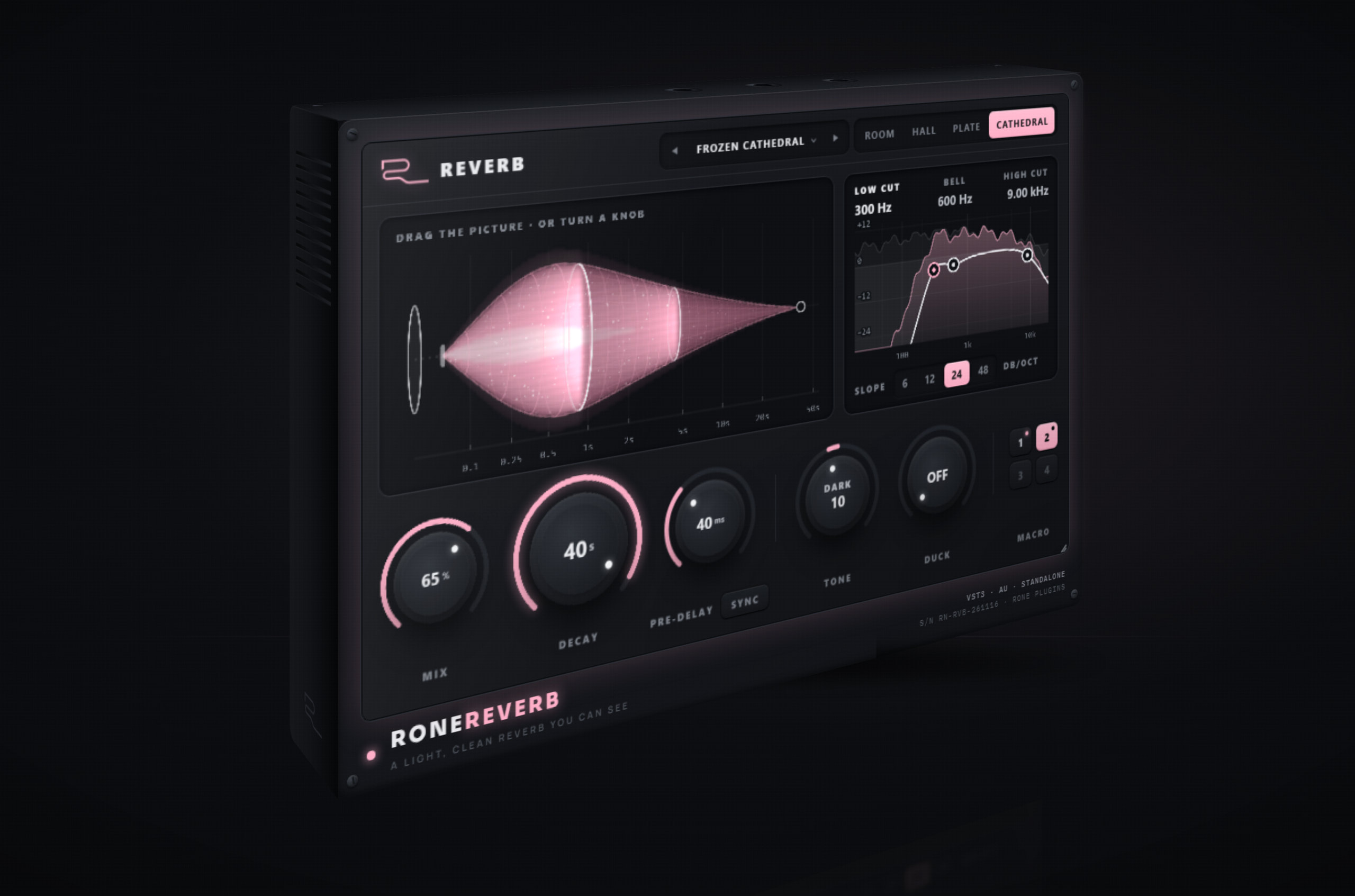
RONE Reverb is the light reverb of the rack: five knobs and four spaces, nothing to dig through. MIX, DECAY from 0.2 to 50 seconds, PRE-DELAY, TONE and DUCK, and SPACE picks the room: Room for close walls, Hall for a big space that blooms slowly, Plate for density from the first moment, Cathedral for a huge stone space.
DUCK is the one you will keep on. The reverb steps back while the dry sound plays and opens in the gaps, so a vocal or a lead stays clear and the space lives between the phrases. TONE sets how long the highs last next to the mids: dark and the highs fade sooner, bright and they ring on. An EQ sits on the reverb only, a low cut and a high cut from 6 to 48 dB/oct and one bell, so the kick and the bass stay dry.
The screen shows the reverb as one body: the dry hit, the silence of the pre-delay, the bloom and the tail to its last moment. It is also a control. Drag its front edge for the pre-delay, drag its end for the decay. 45 presets in 8 categories open in a browser that says what each one is for, and MACRO 1-4 keeps your own sounds in every project.
The real plugin, playing by itself
The real interface, running in your browser on an example loop. The sound engine is stood in for here, so read the numbers as an illustration.
Turn a knob, watch the reverb
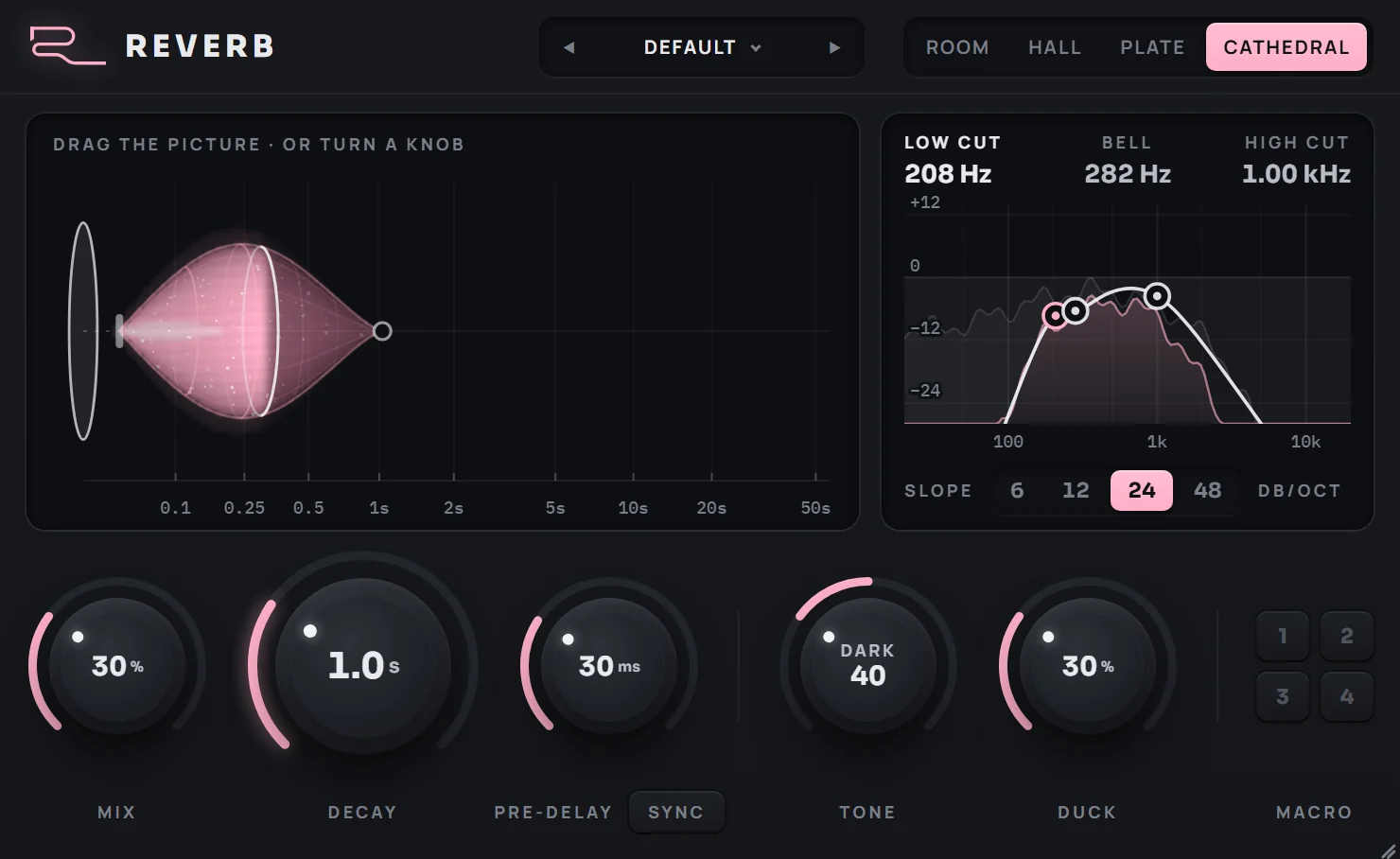
MIX, DECAY, PRE-DELAY, TONE and DUCK - and the picture above them draws what each one does: how long the tail lasts, the gap before it, how dark it is, how far it steps back while you play.
Drag the reverb itself
Grab the end of the tail to make it longer, grab its front edge to start it later. SYNC puts the pre-delay on your tempo, so the tail lands on the grid.
Four spaces, 45 presets
ROOM, HALL, PLATE or CATHEDRAL, then a preset made for the job - vocals, drums, leads, pads, deep endless tails, FX and 100% sends - each with a line that says what it is for.
A clean tail, your own settings
LOW CUT, BELL and HIGH CUT keep the reverb out of the kick and the harsh highs - drag the points. MACRO 1-4 keep four settings of your own, a click away.
What it does
Five knobs, four spaces
MIX, DECAY, PRE-DELAY, TONE and DUCK, and Room, Hall, Plate or Cathedral. Every value is written on its knob: seconds, milliseconds, percent.
DUCK keeps it clear
The reverb bows while the sound plays and opens in the gaps. Vocals and leads stay in front, and the space fills every pause instead of the notes.
An EQ on the tail only
Low cut and high cut with 6, 12, 24 or 48 dB/oct and one bell, on the reverb alone. Keep the low end dry, take the boxy 300 Hz out of a vocal tail.
Drag the picture
A live picture of the reverb: the pre-delay gap, the bloom of the space, the tail to its end. Drag the front edge for pre-delay, the end for decay.
0.2 to 50 seconds
From a short room behind a dry vocal to a 50-second drone under a breakdown. PRE-DELAY runs free up to 250 ms or SYNC in note values at the project tempo.
45 presets, MACRO 1-4
Vocal, Drums, Keys & Plucks, Leads & Synths, Pads & Atmos, Deep & Endless, FX & Transitions and Send 100%, each with a line on what it is for. MACRO saves your own, in every project.
When you reach for RONE Reverb
A few settings to start from.
Space that waits for the words
A plate with a 1/16 pre-delay keeps the words in front, DUCK clears the way while the singer sings, and 450 Hz pulled back in the tail keeps it from sounding boxy.
DUCK 40 % · LOW CUT 300 Hz / 24
A tail that lives in the gaps
A synced pre-delay and a deep duck keep the riff sharp. The tail only blooms between the notes, and nothing below 400 Hz goes into it.
DUCK 55 % · LOW CUT 400 Hz / 24
One chord, a whole breakdown
A Cathedral with a 40-second tail: send it one chord or one word and it holds under the breakdown. Open on top, nothing muddy below 300 Hz.
LOW CUT 300 Hz / 24 · HIGH CUT 9 kHz
Before you install
System requirements
- Windows
- 64-bit · VST3 and Standalone
- macOS
- 10.15 Catalina or later, Intel and Apple Silicon · VST3, AU and Standalone
- Not included
- AAX, CLAP
- Account
- A free RONE account, on up to 2 computers
- Internet
- To sign in and install. After that it keeps working offline for up to 90 days on a lifetime licence, 8 days on ALL ACCESS.
Install in three steps
- Buy it, or start ALL ACCESS. A free RONE account comes with it.
- Download the RONE Plugins Center from the page that opens, install it and sign in.
- The Center installs RONE Reverb and unlocks it. If your DAW does not list it yet, scan for new plugins.
Common questions about RONE Reverb
What formats does RONE Reverb come in, and on which systems?
RONE Reverb runs as VST3, AU and Standalone on macOS 10.15 Catalina or later (Intel and Apple Silicon), and as VST3 and Standalone on Windows (64-bit). It works on mono and stereo tracks, and a mono track can open into a stereo reverb. AAX and CLAP are not included, so Pro Tools is not supported.
Which DAWs does RONE Reverb work in?
Any DAW that loads VST3 on Windows, or VST3 or AU on macOS: Ableton Live, FL Studio, Logic Pro, Cubase, Studio One, Bitwig Studio, REAPER and others. The Standalone version runs on its own, without a DAW.
How much does RONE Reverb cost, and is there a subscription?
RONE Reverb is $29 as a lifetime licence: one payment, no subscription, 2 computers, and every future update of this plugin included. It is also part of RONE ALL ACCESS, every RONE plugin and every future release for $20 a month or $149 a year, with a 14-day free trial.
Is there a free trial of RONE Reverb?
Yes, through ALL ACCESS: the 14-day free trial unlocks every RONE plugin, RONE Reverb included, and nothing is charged until it ends. A lifetime licence is a one-off purchase without a trial.
What does DUCK do?
DUCK turns the reverb down while the dry sound plays and lets it open in the gaps. A vocal or a lead stays clear and in front, and the space shows up between the phrases instead of on top of them. At 0 the reverb stays at full level.
Is the EQ on the whole sound or only on the reverb?
Only on the reverb. The low cut and the high cut each have a 6, 12, 24 or 48 dB/oct slope, and one bell lifts or pulls back a band. The dry sound is never touched, so you can keep the kick and the bass out of the tail without thinning the track.
How long can the reverb tail be?
DECAY runs from 0.2 seconds to 50 seconds. The Deep & Endless presets use tails from 18 to 50 seconds for drones, breakdowns and ambient intros.
Can the pre-delay follow the tempo?
Yes. PRE-DELAY runs free from 0 to 250 ms, or switch on SYNC and it steps through note values from 1/64 to 1/8, including triplets and a dotted 1/16, at the project tempo.
Does RONE Reverb add latency?
None. RONE Reverb adds no latency.
How do I install RONE Reverb?
Buy it, or start ALL ACCESS; a free RONE account comes with it. Download the RONE Plugins Center from the page that opens, install it and sign in. The Center installs RONE Reverb and unlocks it, and keeps it updated from the same card; if your DAW does not list it yet, scan for new plugins.
Where is the RONE Reverb manual?
The full user manual comes with RONE Reverb: it is installed with the plugin as a PDF and opens from the plugin's card menu (Manual) in the RONE Plugins Center, for everyone who owns it or has ALL ACCESS. It covers every control, its range and default, all 45 presets and step-by-step workflows.
Get RONE Reverb
Own RONE Reverb outright, or run it and every other RONE plugin on one pass.
LIFETIME LICENSE
One payment, no subscription — 2 computers, free lifetime updates: every new version of this plugin is yours, never a paid upgrade.
Every RONE plugin, plus everything released from here on, for as long as you subscribe — $20 a month, or $149 a year.
The button marked NOT ON SALE YET means this plugin’s lifetime checkout is not open yet — the price shown is final, and the button starts working the day it opens. ALL ACCESS is live today either way.
SECURE CHECKOUT VIA PADDLE · 14-DAY FREE TRIAL ON ALL ACCESS · CANCEL ANYTIME