
RONE DELAY
One dial, every step written. Echoes that never run away.
One payment · 2 computers · free lifetime updates · or the whole rack on one pass
 + RONE VST MANAGER, free foreverAll your plugins in one library, one click away from your DAW. It's $39 on its own and comes free with this plugin.
About RONE Delay
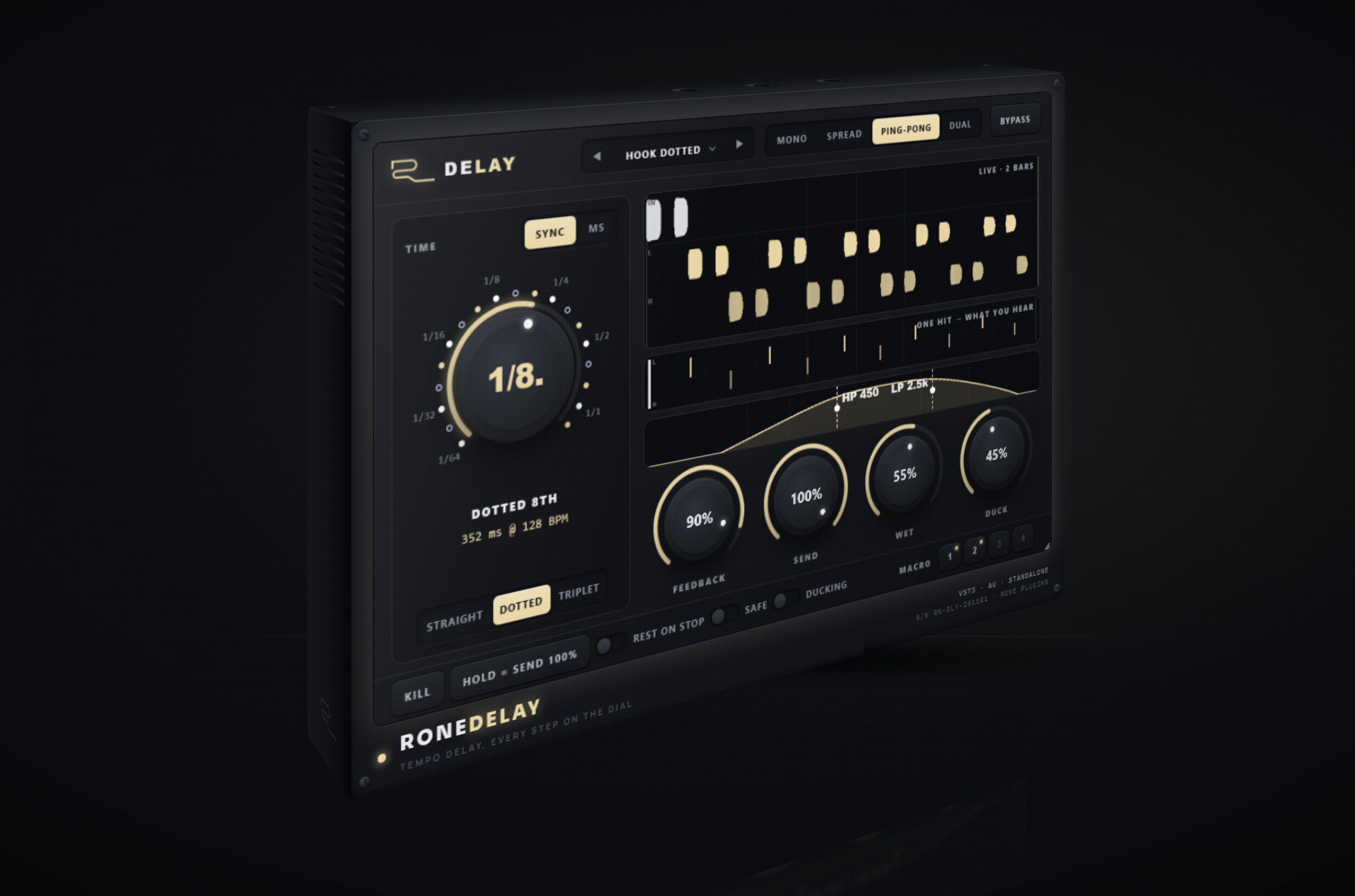
RONE Delay is the delay you read at a glance. One TIME dial turns through every note value in order, straight, dotted and triplet, and the step you are on is written out in full under it, with its milliseconds. No guessing what a dot means, no menu to open. Switch it to MS when you want a free time instead.
Four modes set where the echoes go. MONO keeps them in the middle, SPREAD widens them, PING-PONG throws them left, right, left, and DUAL runs two delays with a dial each, left and right side by side. HP and LP sit inside the feedback loop, so every repeat comes back a little darker or thinner, never muddier. Drag the handles, and use the wheel on a handle for its slope.
SEND and WET are two different faders on purpose. Close SEND and what is already in the delay keeps ringing: the throw. Close WET and the echoes are gone at once. DUCK lowers the echoes while the sound plays and brings them back in the gaps. A SAFE limiter rides the feedback, so even 100 %, an endless hold, never climbs past 0 dB. The dry sound is never touched.
The real plugin, playing by itself
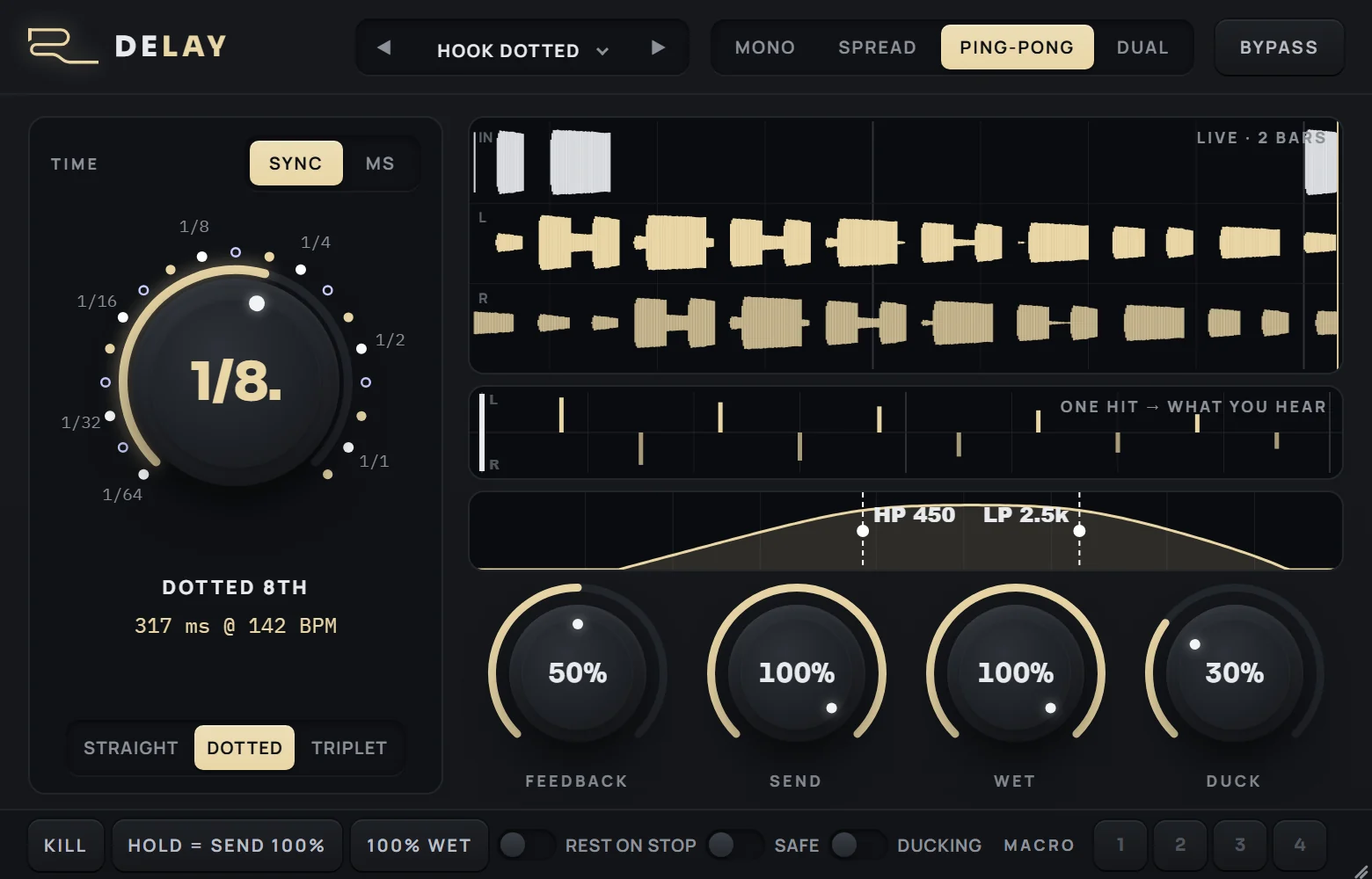
The real interface, running in your browser on an example loop. The sound engine is stood in for here, so read the numbers as an illustration.
One dial, every step written
Turn it and it walks through straight, dotted and triplet in order, with the name of the step and its milliseconds under it. Click a label on the ring to jump there, or switch to MS for a free time.
Where the echoes go
MONO keeps them in the middle, SPREAD widens them, PING-PONG throws them left, right, left. DUAL is two delays with a dial each - here 1/8 on the left and a dotted quarter on the right.
A filter inside the feedback
Drag LP and HP and every repeat comes back a little darker and thinner; the wheel on a handle sets its slope. FEEDBACK at 100 % holds the echoes forever, SAFE keeps them under 0 dB, and KILL clears the tail.
Throw one word into it
Pick a preset from the list - HOLD THROW keeps SEND closed, so nothing goes in until you hold HOLD. Hold it over the word you want, let go, and only that word keeps echoing.
What it does
One dial, every step written
Straight, dotted and triplet in one turn, synced to the host, with the value and its milliseconds under the dial. Click a label to jump to it, or switch to free MS.
Ping-pong and dual
MONO, SPREAD, PING-PONG, or DUAL: two delays, each with its own TIME dial, side by side. A quarter on the left and a dotted eighth on the right in two turns.
A filter in the loop
HP and LP inside the feedback, so the repeats shape themselves as they fade. Drag the handles, use the wheel for the slope from 6 to 48 dB/oct, double-click to switch one off.
SEND, WET, HOLD, KILL
Close SEND and the tail keeps ringing, close WET and it is gone. HOLD throws a word into the delay while you hold it. KILL clears the tail in 20 ms.
DUCK and SAFE
The echoes dip under the sound and come back in the gaps. SAFE keeps the feedback under 0 dB, all the way to an endless hold at 100 %.
See what you hear
A live view of the last two bars, your sound and its echoes, plus one hit drawn as the echoes it becomes. Four MACRO places keep your own settings, the same in every project.
When you reach for RONE Delay
A few settings to start from.
One word into the delay
Keep SEND at zero and hold HOLD on the last word of a phrase. Only that word goes in, and it keeps ringing after you let go. DUCK keeps the echoes out of the next line.
SEND 0 % · HOLD on the word
Two times, one stereo field
On a lead or a pluck, DUAL with a quarter on the left and a dotted eighth on the right. The two sides never repeat together, so the lead gets wide without a chorus.
LEFT 1/4 · RIGHT 1/8 DOTTED
Repeats that sit behind the mix
Raise HP to clear the low end out of the loop and pull LP down, and every repeat comes back darker than the one before, fading behind the mix instead of on top of it.
FEEDBACK 55 %
Before you install
System requirements
- Windows
- 64-bit · VST3, AAX and Standalone
- macOS
- 10.15 Catalina or later, Intel and Apple Silicon · VST3, AU, AAX and Standalone
- Pro Tools
- AAX on Windows and macOS.
- Not included
- CLAP
- Account
- A free RONE account, on up to 2 computers
- Internet
- To sign in and install. After that it keeps working offline for up to 90 days on a lifetime licence, 8 days on ALL ACCESS.
Install in three steps
- Buy it, or start ALL ACCESS. A free RONE account comes with it.
- Download the RONE Plugins Center from the page that opens, install it and sign in.
- The Center installs RONE Delay and unlocks it. If your DAW does not list it yet, scan for new plugins.
Common questions about RONE Delay
What formats does RONE Delay come in, and on which systems?
RONE Delay runs as VST3, AU and Standalone on macOS 10.15 Catalina or later (Intel and Apple Silicon), and as VST3 and Standalone on Windows (64-bit). It also installs as AAX on Windows and macOS, so it runs in Pro Tools. CLAP is not included.
Which DAWs does RONE Delay work in?
Any DAW that loads VST3 on Windows, or VST3 or AU on macOS: Ableton Live, FL Studio, Logic Pro, Pro Tools (AAX), Cubase, Studio One, Bitwig Studio, REAPER and others. The Standalone version runs on its own, without a DAW.
How much does RONE Delay cost, and is there a subscription?
RONE Delay is $29 as a lifetime licence: one payment, no subscription, 2 computers, and every future update of this plugin included. It is also part of RONE ALL ACCESS, every RONE plugin and every future release for $20 a month or $149 a year, with a 14-day free trial.
Is there a free trial of RONE Delay?
Yes, through ALL ACCESS: the 14-day free trial unlocks every RONE plugin, RONE Delay included, and nothing is charged until it ends. A lifetime licence is a one-off purchase without a trial.
Can the feedback in RONE Delay run away?
No. A SAFE limiter keeps feedback up to 100 percent, an endless hold, from ever passing 0 dB; HOLD throws a word into the loop and KILL cuts it in 20 ms. HP and LP filters sit inside the feedback loop, 6 to 48 dB/oct, and the dry sound is never touched.
How do I set the delay time?
One TIME dial steps through straight, dotted and triplet values with every step written on it, or runs free in milliseconds. MONO, SPREAD, PING-PONG and DUAL (two TIME dials) set the stereo picture; SEND closes the input and keeps the tail, WET cuts the echoes.
Does RONE Delay add latency?
None. RONE Delay adds no latency, so it can sit on a bus or a live channel without shifting the beat.
How do I install RONE Delay?
Buy it, or start ALL ACCESS; a free RONE account comes with it. Download the RONE Plugins Center from the page that opens, install it and sign in. The Center installs RONE Delay and unlocks it, and keeps it updated from the same card; if your DAW does not list it yet, scan for new plugins.
Where is the RONE Delay manual?
The full user manual comes with RONE Delay: it is installed with the plugin as a PDF and opens from the plugin's card menu (Manual) in the RONE Plugins Center, for everyone who owns it or has ALL ACCESS. The video tutorial is free at roneaudio.com/manuals/ and on the RONE PLUGINS YouTube channel.
Get RONE Delay
Own RONE Delay outright, or run it and every other RONE instrument on one pass.
LIFETIME LICENSE
One payment, no subscription — 2 computers, free lifetime updates: every new version of this plugin is yours, never a paid upgrade.
Every RONE plugin, plus everything released from here on, for as long as you subscribe — $20 a month, or $149 a year.
The button marked NOT ON SALE YET means this plugin’s lifetime checkout is not open yet — the price shown is final, and the button starts working the day it opens. ALL ACCESS is live today either way.
SECURE CHECKOUT VIA PADDLE · 14-DAY FREE TRIAL ON ALL ACCESS · CANCEL ANYTIME