
One-Knob Build-Ups and Risers | RONE Rise Complete Guide · 7 min · Watch on YouTube
1Welcome to RONE Rise
RONE Rise turns whatever you put through it into a build-up. One knob, INTENSITY, drives a whole chain the way you would automate it by hand over eight bars: a steep high-pass takes the low end away, a big reverb opens up, echoes and noise climb in, and in the bigger modes a gate speeds up, the pitch rides upward and a barber-pole shimmer climbs forever. Pull the knob back to zero on the downbeat and the drop lands - with the reverb and the echoes still ringing under it instead of dying on the one.
The sun on the right is the knob made visible: it sleeps below the horizon at zero, rises and grins as you turn it up, and pulses on every beat while the host plays.
Where it shines
- The last 8 bars before a drop - on the mix bus, the drum bus or a music group.
- Transitions - a four-bar lift between two sections without touching a single filter.
- Live and in the DJ set - LAND ON BAR runs the rise for you and lands it on the bar.
- The drop that breathes - TAIL keeps the wash under the first bar of the drop.
The 10-second version
- Insert Rise on your mix or drum bus.
- Pick LIFTOFF.
- Automate INTENSITY from 0 to 100 over the last 8 bars.
- Snap it back to 0 on the drop.
2Installation with the RONE Plugins Center
Every RONE product is installed, updated and licensed through one application: the RONE Plugins Center. You never download individual installers by hand, and you never enter serial numbers into the plugin itself.
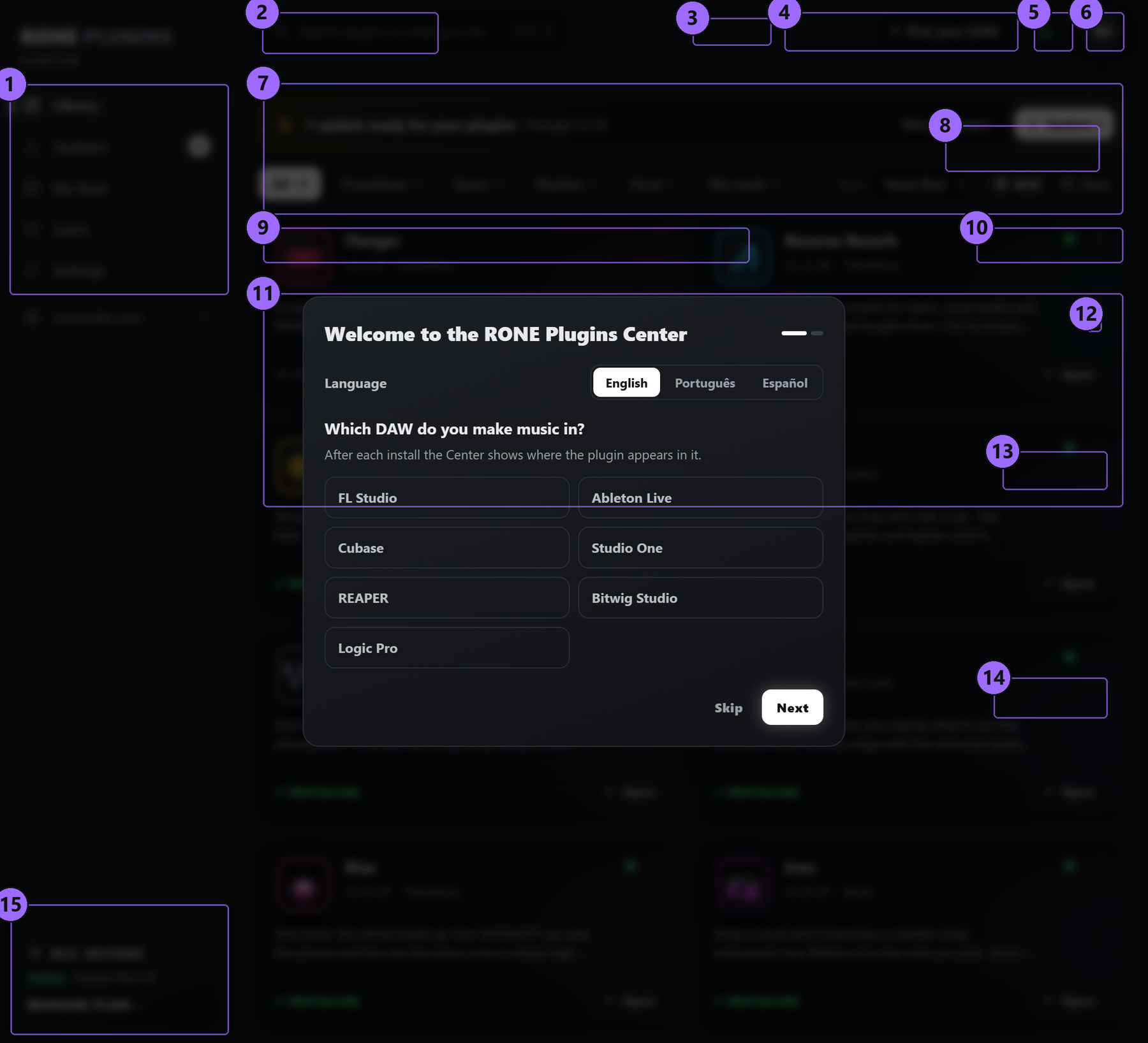
Step by step
- Download the Center from roneaudio.com and run the installer (Windows:
RONE_Plugins_Center_Installer.exe, macOS:RONE_Plugins_Center.dmg). On Windows the installer also adds the Microsoft WebView2 runtime if your PC does not have it yet; it is required for the plugin interfaces. On macOS (10.15 Catalina or later, Intel and Apple Silicon) open the .dmg and drag the Center onto Applications. It is signed and notarized by Apple, so macOS only asks once whether you want to open an app downloaded from the internet: press Open. - Open the Center and sign in with your roneaudio.com account (the same e-mail and password you used on the website). Your licences and device slots are checked automatically: an active ALL ACCESS plan unlocks every plugin, and a lifetime licence unlocks the plugin it was bought for — so RONE Rise opens either way.
- Find RONE Rise in the list and press INSTALL. The Center downloads the signed installer, verifies its checksum, installs it silently and registers the version.
- When the card shows INSTALLED, start (or restart) your DAW and rescan plugins if it does not pick up new plugins automatically. All RONE plugins appear next to each other in your plugin list because every name starts with RONE.
- Updates appear on the same card. Press UPDATE on one plugin or UPDATE ALL at the top. Close the standalone version of a plugin before updating it.
Where the files go
Windows
| File | Location |
|---|---|
| VST3 | C:\Program Files\Common Files\VST3\RONE\RONE Rise.vst3 |
| Standalone app | C:\Program Files\RONE Plugins\RONE Rise.exe |
| This manual | C:\Program Files\RONE Plugins\Manuals\ |
macOS
| File | Location |
|---|---|
| VST3 | /Library/Audio/Plug-Ins/VST3/RONE Rise.vst3 |
| Audio Unit | /Library/Audio/Plug-Ins/Components/RONE Rise.component |
| Standalone app | /Applications/RONE Rise.app |
| This manual | /Users/Shared/RONE Plugins/Manuals/ |
Licence and activation
Licensing is tied to your account, not to a key. The plugin checks the licence file that the Center writes when you sign in. There are two ways to own it: an ALL ACCESS plan, which unlocks every RONE plugin for as long as it is active, or a lifetime licence for this plugin alone, which never expires. Either one opens RONE Rise, and buying the lifetime licence later does not disturb a plan you already have.
If a plugin ever shows a RONE Bundle License Required screen, open the Center, make sure you are signed in and the plugin shows as licensed, then reopen it. Two devices can be signed in at the same time on either kind of licence; sign out on an old machine from the Center's Account page to free a slot. A lifetime licence keeps working offline for far longer than a plan does — there is nothing for it to expire against — but the Center still needs to reach the internet occasionally to confirm it.
Uninstalling
Windows: Settings → Apps → RONE Rise (RONE). macOS: delete the bundles listed above. Presets and settings in your user folder are kept.
3Quick start
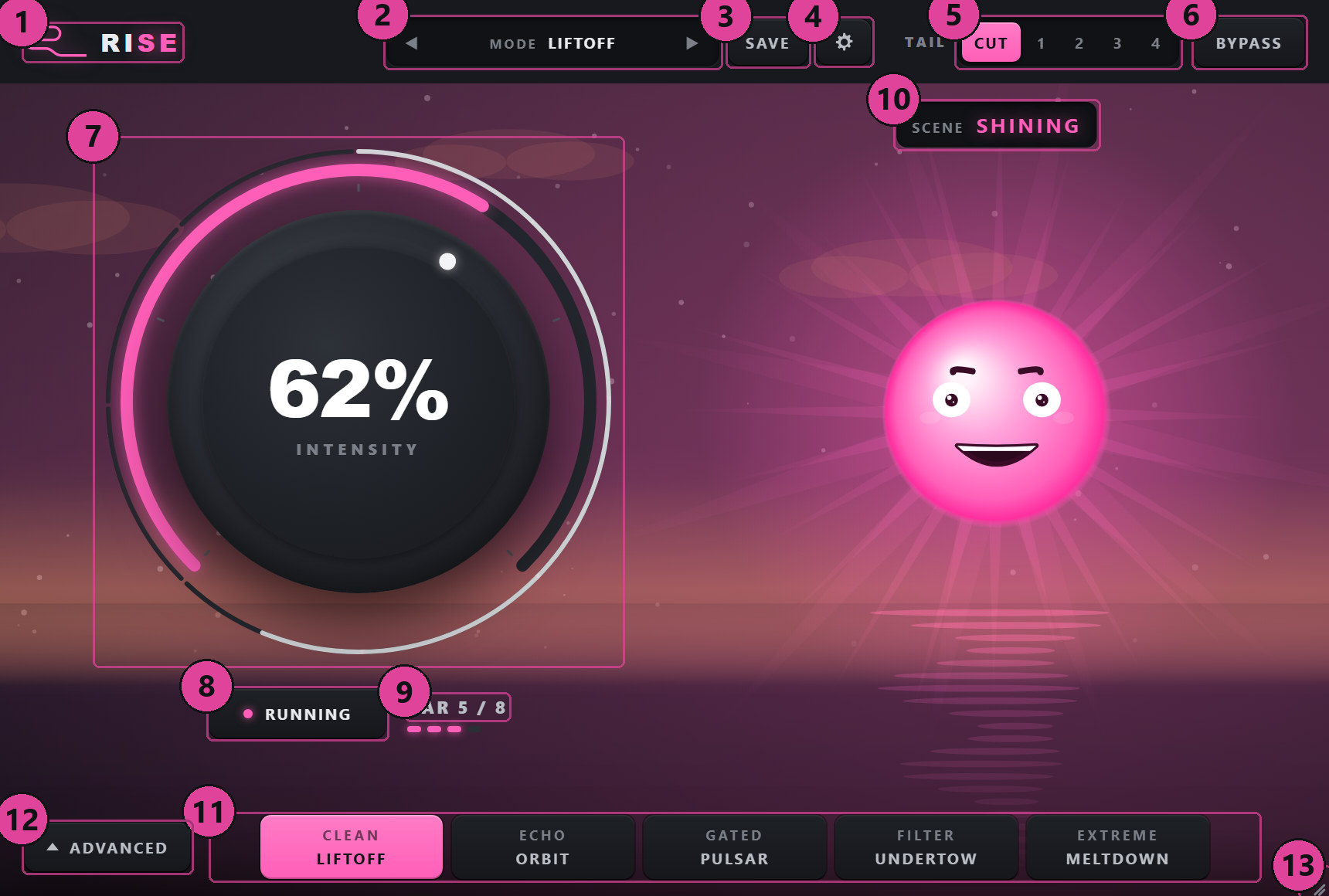
- Insert Rise on the mix bus or a group bus. At 0 % it does nothing at all.
- Pick a mode along the bottom - LIFTOFF is the clean, classic lift - or a preset from the bar on top (17 of them, from CLEAN LIFT to CHAOS).
- Automate INTENSITY from 0 to 100 % over the bars before the drop. A curve that stays low and rises late sounds most natural.
- Pull it back to 0 on the drop. With TAIL on CUT (the default) the drop is a hard stop; set TAIL to 1-4 bars in the header and the reverb and echoes keep ringing into the drop.
- Or let it run itself: open ADVANCED, set LAND ON BAR to 8 and press GO. The rise starts from the bar you pressed it in and lands exactly eight bars later.
4Interface tour
5Controls reference
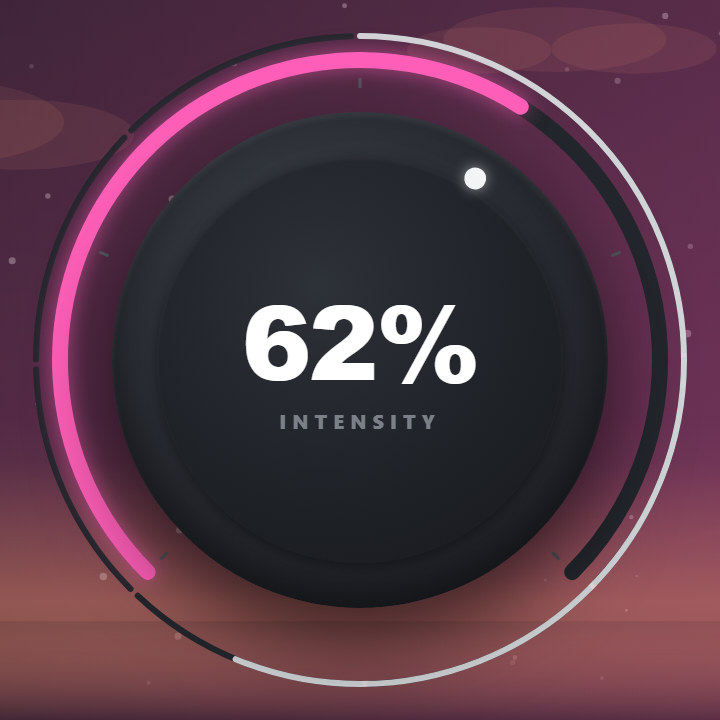
The whole build-up on one knob. At 0 % the plugin passes the signal untouched (it nulls). As it rises every stage of the chain follows its own curve: the high-pass sweeps up faster near the top, the reverb and echoes open steadily, the noise comes in late. A fast pull back to zero is a drop: the tail keeps ringing (see TAIL).
A mode chooses the fixed parts of the chain (the drive, and the Shepard speed-up in MELTDOWN) and loads the nine macros. LIFTOFF: a 24 dB/oct high-pass up to about 340 Hz and a 45 % reverb - the clean lift. ORBIT: LIFTOFF with a dotted-8th ping-pong echo and a breath of noise. PULSAR: the high-pass sweep to about 1.7 kHz, a tempo gate that speeds up, noise, a hint of the Shepard climb and the pitch rising 100 Hz. UNDERTOW: the opposite build-up - a low-pass closes the mix down to about 500 Hz under a huge reverb, and the drop opens the sky. MELTDOWN: everything at once, the pitch rising 200 Hz and the Shepard climb racing with the knob.
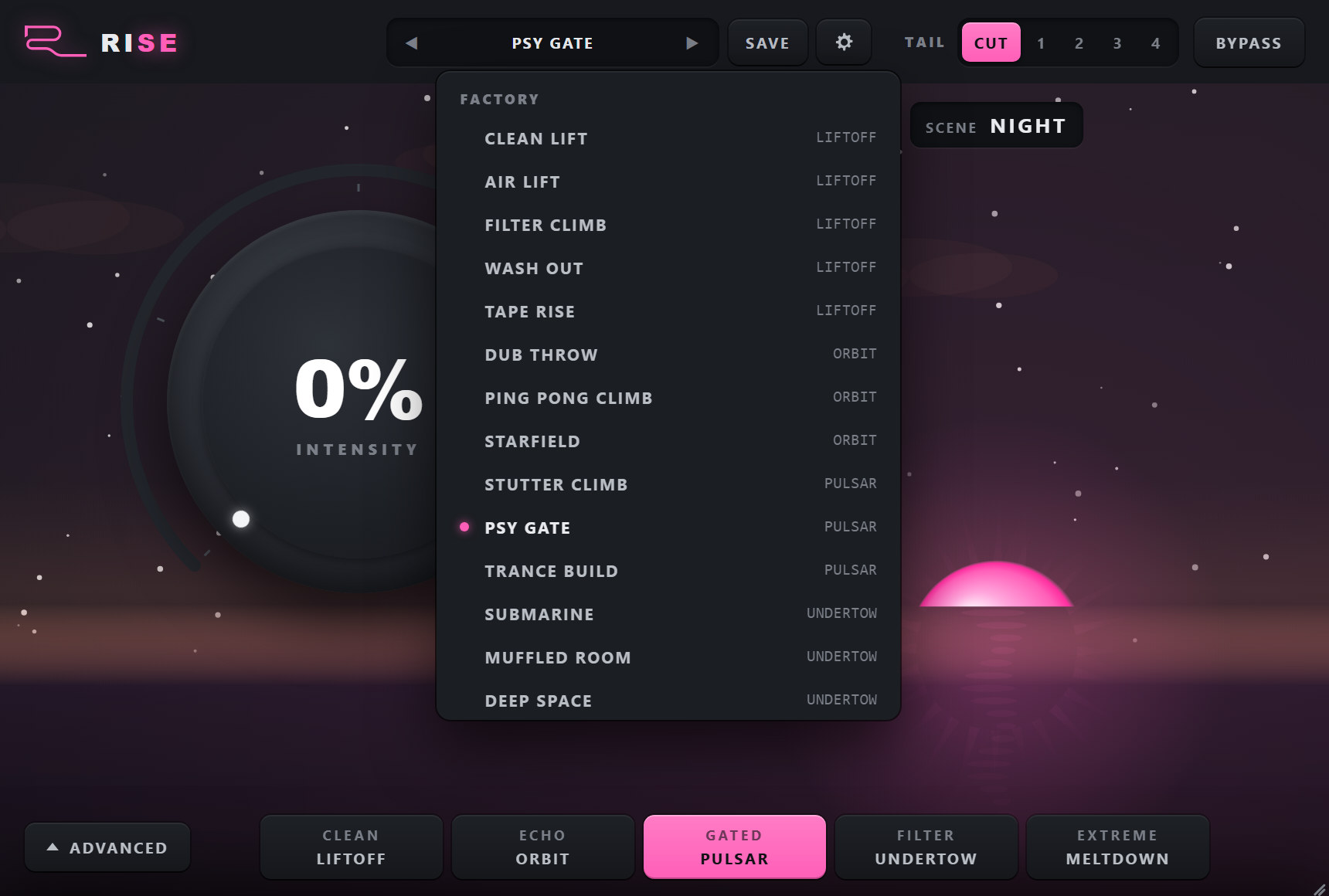
The bar on top loads a whole preset: a mode and all nine macros. The factory set: CLEAN LIFT, AIR LIFT, FILTER CLIMB, WASH OUT, TAPE RISE (LIFTOFF); DUB THROW, PING PONG CLIMB, STARFIELD (ORBIT); STUTTER CLIMB, PSY GATE, TRANCE BUILD (PULSAR); SUBMARINE, MUFFLED ROOM, DEEP SPACE (UNDERTOW); BLAST OFF, WARP DRIVE, CHAOS (MELTDOWN). Click the name for the list; the arrows step through factory and user presets in turn. A * after the name means a macro was moved since it loaded.
SAVE PRESET keeps the current mode and macros under a name of your choice (the same name again replaces it). SAVE AS <MODE> MACROS makes them the mode card's own: from then on a click on that card, or the host switching to that mode, loads your macros, and the bar shows the mode with (MINE).
RESET TO FACTORY MACROS brings every mode card back to its factory macros and reloads the card in use. DELETE removes the preset of yours that is loaded. Your saved presets stay until you delete them.
What the reverb and echoes do when the knob falls. On CUT (the default) they stop dead on the drop - the hard stop. With 1-4 bars they are fed by the knob, but their level only follows it down slowly; once the knob reaches zero they hold for the first third of the TAIL, then fade out over the rest, in the room they had at the top. So a snap to zero and a quick fade both leave a real tail under the drop.
The untouched input with a 10 ms crossfade. While bypassed nothing runs, so the next un-bypass starts clean.
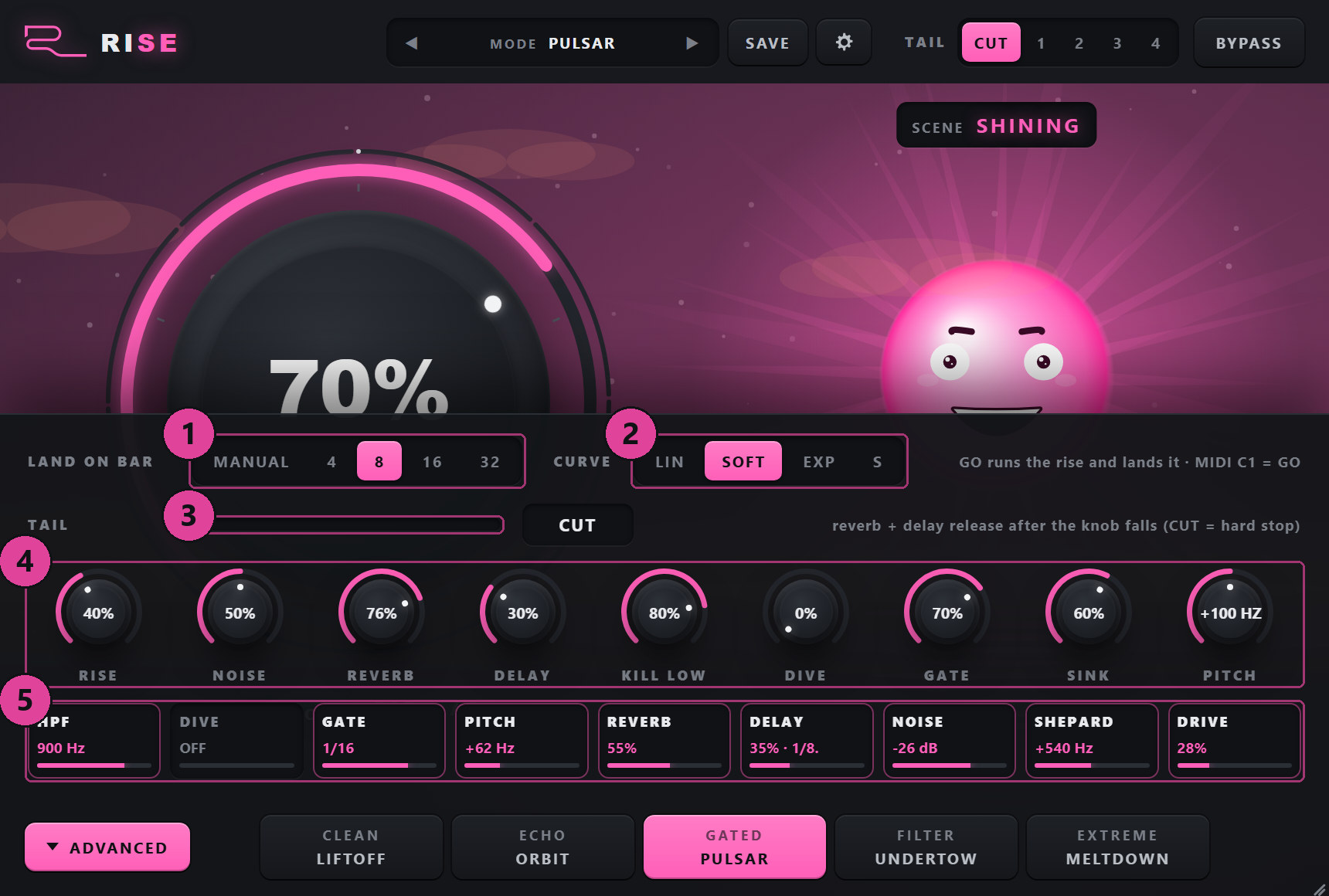
ADVANCED
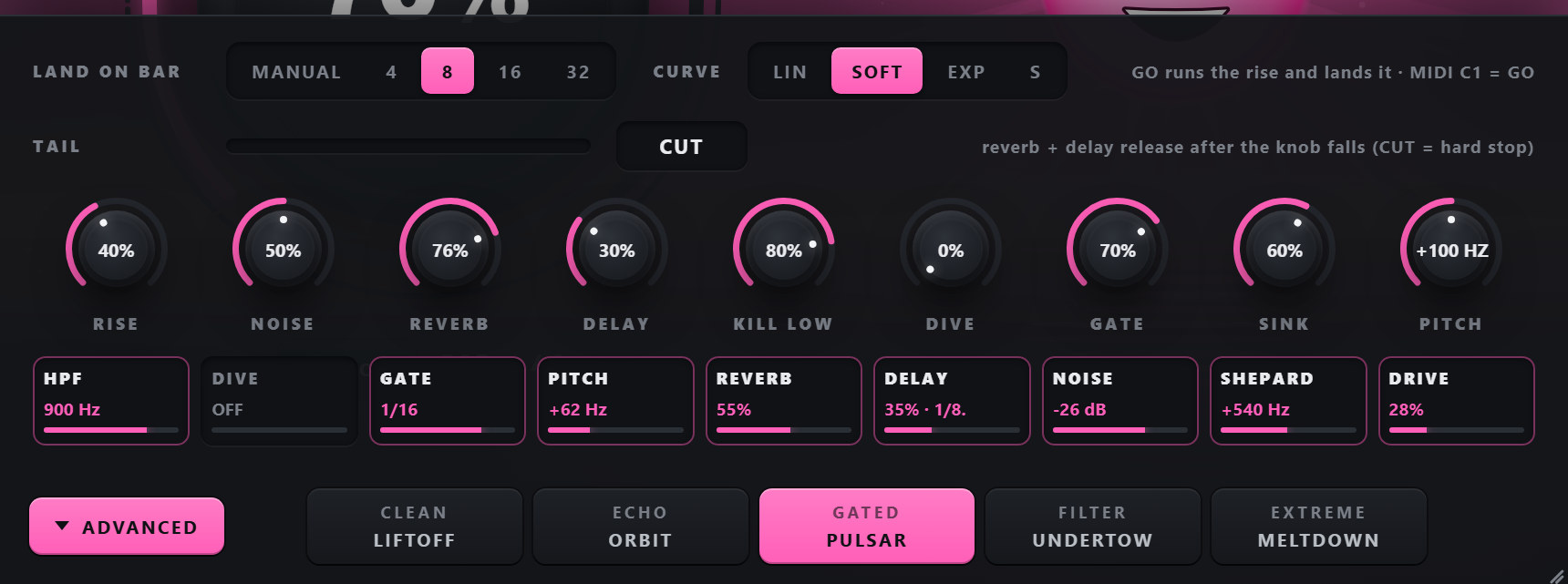
MANUAL: you move or automate INTENSITY yourself. With a bar count set, a GO button appears under the knob. GO starts the rise from the beginning of the bar you pressed it in and runs it to 100 % so that it lands exactly on the downbeat that many bars later; the outer ring of the knob counts the bars. After the landing the plugin stays at zero until you touch the knob again. GO while running cancels, and so does moving the knob.
How a LAND run climbs. LIN is a straight line; SOFT (default) stays a little lower and speeds up; EXP stays almost silent for the first half and puts everything in the last bars; S pushes once more at the very end.
The Shepard climb: a barber-pole frequency shifter that seems to rise forever, cycling every two bars (faster with the knob in MELTDOWN).
White noise through a resonant high-pass that sweeps from 150 Hz to about 5 kHz as the knob rises. It also feeds the reverb, so it arrives as a washed riser, not as hiss.
How much reverb the chain adds. 0 turns the reverb off.
The dotted-8th ping-pong echo: its level, and how much it feeds back. 0 turns it off.
How far the high-pass goes at the top of the knob: 35 % reaches about 340 Hz, 80 % about 1.7 kHz, 100 % about 3 kHz - the same in every mode (since 1.0.15; older projects were moved over so they sound exactly as before).
A 24 dB/oct low-pass that closes the top down to about 500 Hz as the knob rises - the underwater build.
A tempo-synced gate on the dry signal. Its division halves as the knob rises: quarter notes, eighths, sixteenths, thirty-seconds. The amount sets how deep it chops.
How far the dry signal sinks at 100 %: 55 % is about -7 dB. At 0 the dry never gets quieter and the plugin only adds.
Frequency-shifts the dry signal up as the knob rises, up to +200 Hz at 100 %. Every partial moves by the same number of hertz, so it reads as a tape-like lift with a metallic edge rather than a clean transposition.
Every stage with what it is doing right now: HPF and DIVE in hertz, the GATE division, the PITCH shift, REVERB and DELAY levels, the NOISE level, the SHEPARD range and DRIVE.
Double-click a macro to return it to the loaded preset's value (or the mode card's).
6Step-by-step workflows
The classic 8-bar build
- Insert Rise on the mix bus (or on everything except the kick if you want the kick to keep pumping).
- LIFTOFF, TAIL 1 bar (the switch next to BYPASS).
- Draw INTENSITY from 0 at the start of the 8 bars to 100 % at the end, with a curve that stays low and rises late.
- Draw it straight back to 0 on the drop. The reverb rings under the first bar of the drop.
Hands-free: LAND ON BAR
- ADVANCED: LAND ON BAR 8, CURVE SOFT.
- Press GO (or send MIDI C1, or step the Go parameter) anywhere in the bar where the build starts.
- The rise runs from that bar and lands exactly eight bars later. The plugin stays at zero until you touch the knob.
The underwater drop
- UNDERTOW (or the SUBMARINE preset), TAIL 2 bars.
- Rise over 8 bars: the mix closes down under a huge reverb.
- On the drop the full-range mix comes back all at once, with the wash still fading behind it.
Festival build
- PULSAR (or PSY GATE, TRANCE BUILD): the gate speeds up bar by bar, the pitch rises 100 Hz, noise sweeps in.
- For more, MELTDOWN (or BLAST OFF, CHAOS): +200 Hz, the Shepard climb racing, full noise.
- Turn PITCH down in ADVANCED if the lift sounds too metallic on your material.
Your own build, every time
- Load the preset or mode closest to what you want and move the macros in ADVANCED until it is yours.
- SAVE > type a name > SAVE PRESET. It is in the preset list of every project from now on.
- Or SAVE AS <MODE> MACROS to make it what that mode card loads; Settings > RESET TO FACTORY MACROS undoes it.
7Tips, tricks and troubleshooting
Tips
- Late is better. Most of the change should happen in the last two or three bars - use CURVE EXP for LAND runs, or draw the automation that way.
- Keep the kick out of the bus Rise sits on if you want the groove to keep driving through the build.
- SINK 0 turns Rise into a pure add-on: nothing ever gets quieter.
- Stop means quiet. When the song stops, Rise lets its tail go and rests at zero until you press play or touch the knob, so a build left half-way never colours what you audition next.
- Presets are starting points. Every macro works in every mode: add DIVE to ORBIT, a GATE to LIFTOFF - then SAVE it.
Troubleshooting
| Symptom | Cause | Fix |
|---|---|---|
| Nothing happens | INTENSITY is at 0 (the plugin nulls there) | Turn it up, or press GO with LAND ON BAR set |
| No GO button | LAND ON BAR is MANUAL | Set 4, 8, 16 or 32 bars in ADVANCED |
| The knob went back to 0 after a GO run | That is the landing - the plugin stays at zero until the knob moves | Move the knob to take over again |
| The build gets quieter | SINK lowers the dry so the drop can jump | Lower SINK in ADVANCED, 0 = never quieter |
| The tail stops dead on the drop | TAIL is CUT (the default since 1.0.15) | Set TAIL to 1-4 bars with the switch next to BYPASS |
| A mode card loads different macros than before | You saved your own macros for that card | Settings (the gear) > RESET TO FACTORY MACROS |
| The effect switched off when I stopped the song | REST ON STOP: when the host stops, Rise fades its tail and rests at zero, whatever the automation left INTENSITY at - it never keeps building or ringing into a stopped project | Press play again, or touch the knob |
| The lift sounds metallic | PITCH is a frequency shift, not a transposition | Lower PITCH in ADVANCED |
| The window is white in Ableton Live, the standalone works (Windows) | Live's Auto-Scale Plug-In Window (seen with Windows display scaling such as 110 %) | In Live's browser open Plug-Ins, right-click the plugin and untick Auto-Scale Plug-In Window, then delete the plugin from the track and insert it again |